Skip to content

Did Ilock the door?Now you'll know.

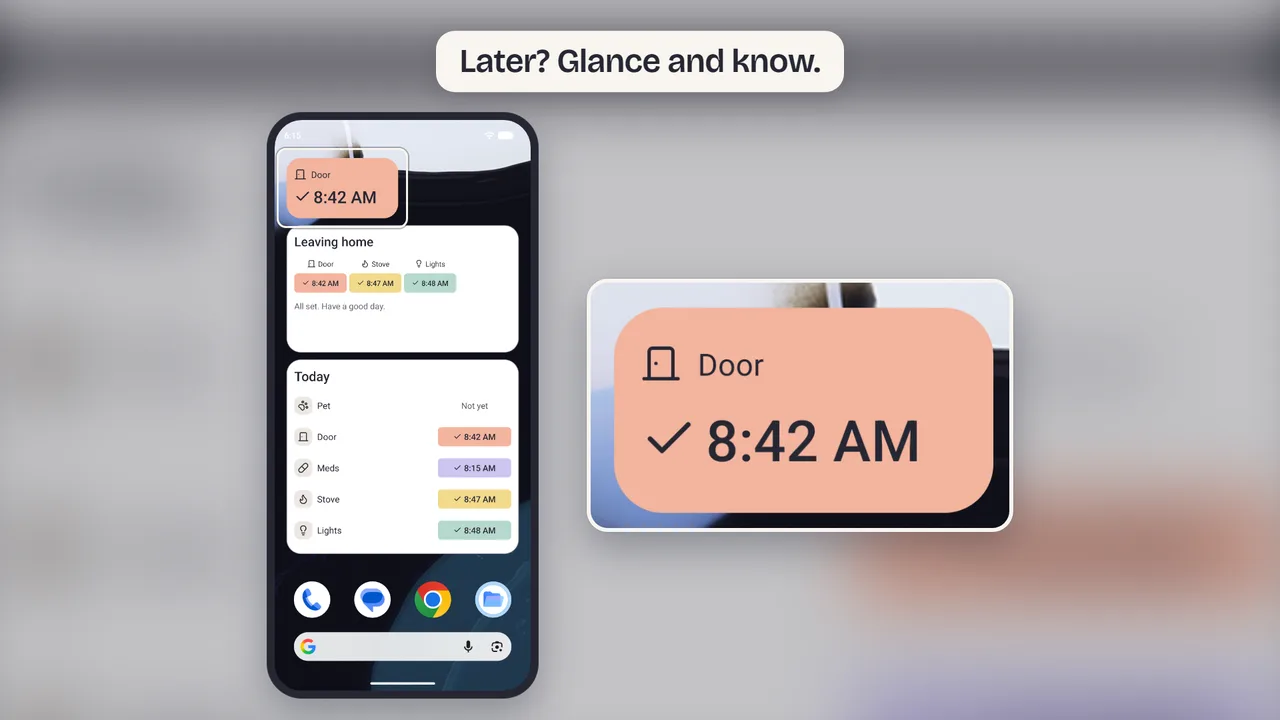
DidTap is an Android widget for the little doubts: door, meds, stove. Tap it right after you do the thing. Later, one glance tells you: done today, at 8:42 AM.

Android 8+ · No account · No ads · Pay once

Try it: tap the door.

That's it. That's the app.

You did it. You just don't remember doing it.

Halfway to work, the doubt hits: did I lock the door? You did, on autopilot. And autopilot doesn't save memories. So you turn around, or you worry all day. DidTap gives your brain a receipt.

Did I lock the door?

8:42 AM

How DidTap works

  1. Do it, then tap.

    Lock the door, tap the widget. One second.

  2. Glance when the doubt hits.

    Your home screen shows what's done today, and the exact time.

  3. Get a nudge only if it's not done.

    Set a reminder for 9 PM. If you already tapped, DidTap stays quiet.
Today
  • PetNot yet
  • Door8:42 AM
  • Meds9:05 AM
  • Stove7:30 PM
DidTapPet — not yet todayMark it done, or get one reminder in 30 minutes.Mark doneIn 30 min

DidTap in 43 seconds

Read the text of the video
  1. Did I lock the door?
  2. Tap once, right after.
  3. Later? Glance and know.
  4. The exact time, every time.
  5. Door, Meds, Stove, Pet…
  6. Right on your home screen.
  7. One tap from Quick Settings.
  8. A nudge, only if not yet.
  9. Every tap, with its time.
  10. Light and dark, like your phone.
  11. No account. No tracking.
  12. DidTap. Stop wondering. Glance and know. Get it on Google Play.

Answers on your home screen

Four widgets, a Quick Settings tile and tags you can stick by the door. Pick what fits your day.

  • Door
    8:42 AM

    One task

    One doubt, one widget.

  • Today
    • MedsNot yet
    • Door8:42 AM

    Today

    Everything you check, at a glance.

  • Leaving home
    • Door8:42 AM
    • Stove8:39 AM
    • LightsNot yet

    Still to check: Lights

    Leaving home

    Door, stove, lights, windows. Check them all before you go.

  • Still to check
    • PetNot yet

    Still to check

    Only what's left. Empty means you're good to go.

  • Door
    Not yet
    Meds
    9:05 AM

    Quick Settings tile

    Mark it done from the top of your screen, even when your phone is locked.

  • 8:42 AM

    NFC tags and QR labelsPro

    Stick a tag by the door. Hold your phone to it. Done.

See all features

Leaving home, in one look

Put the four things you check before you go in one widget. Tap each one as you do it. The last line tells you what's left.

Leaving home
  • Door8:42 AM
  • Stove8:39 AM
  • LightsNot yet
  • Windows8:40 AM

Still to check: Lights

Already done at 8:42 AM

About to do it again? DidTap shows when it was already done, so you don't do it twice.

Already done today 8:42 AM.

You can leave it as is, or log another time.

Keep 8:42 AMLog again

Made for ADHD brains. And anyone who has ever turned around to check.

  • No streaks. No scores. No guilt.

  • Nothing turns red. "Not yet" just means not yet.

  • Forgot to tap? Add it later, or fix the time.

  • Your day starts at 4 AM, so night owls don't reset at midnight.

  • Ready in 30 seconds: door, meds, stove, pet, lights, windows, car.

DidTap for ADHD

Your doubts stay on your phone

No account. No ads. No tracking. DidTap collects no data: your tasks and history never leave your phone. Back them up to a file or a folder whenever you like.

Purchases are handled by Google Play.

Privacy policy

Free to start. Pay once for more.

Free

Everything you need for the daily doubts.

Free

  • 6 tasks
  • 3 reminders
  • All widgets
  • 7-day history
  • Automatic backup and export to a file

DidTap Pro

Pay once, yours forever.

Pay once

One-time purchase

  • Unlimited tasks
  • Unlimited reminders, several a day
  • Full history, month by month
  • Checklists and several times a day
  • Task colors and widget customization
  • 1,800+ icons
  • Custom rhythms
  • Tags and labels (NFC and QR)
  • Future solo features

No subscription for solo use.

Compare Free and Pro

Questions

What is DidTap?

DidTap is an Android app and widget that records when you did everyday things, like locking the door or feeding the cat. Tap once when it's done; later, a glance tells you if it's done today and at what time.

Is DidTap free?

Yes. The free version includes 6 tasks, 3 reminders, all widgets, 7 days of history, notes on entries, and automatic backup or export to a file. DidTap Pro is a one-time purchase that unlocks unlimited tasks and more.

Is there a subscription?

No. Pro is paid once.

Does DidTap know if my door is actually locked?

No. DidTap records the moment you tapped. It never says the door is locked or the stove is off.

Is DidTap a medication app?

No. DidTap is a memory aid, not a medical device. It doesn't track amounts or give medical advice. To organize your medicines, ask your pharmacist or use a pill organizer.

What data does DidTap collect?

None. No account, no analytics, no ads. Your tasks and history stay on your phone. Purchases are handled by Google Play.

All questions

Personal project

DidTap is a personal project I designed and built. The app is finished, but its release is on hold: it will not be published before 2027 at the earliest.

See my portfolio